- Play
- Results
- Real Winners
- More
- Need a hand? Visit ourHelp Centre
Select a game to play
NEW
Quick & easy
My saved
Favourites
NEW
Quick & easy
NEW
Saturday
Announced soon
NEW
Saturday
NEW
Saturday
Announced soon
NEW
Saturday
NEW
Saturday
Announced soon
NEW
Saturday
NEW
Saturday
Announced soon
NEW
Saturday
NEW
Coming soon
PRE-SALE
NOW OPEN
NEW
Coming soon
NEW
Tuesday
Announced soon
NEW
Tuesday
NEW
Thursday
Announced soon
NEW
Thursday
NEW
Sunday
Announced soon
NEW
Sunday
NEW
Every day
Announced soon
NEW
Every day
NEW
Raffle style
Announced soon
NEW
Raffle style
NEW
Raffle style
Announced soon
NEW
Raffle style
NEW
Saturday
Announced soon
NEW
Saturday
NEW
Saturday
Announced soon
NEW
Saturday
NEW
Saturday
Announced soon
NEW
Saturday
NEW
Play in-store
Announced soon
NEW
Play in-store
NEW
Monthly
$10,000*
2nd Chance Draw
NEW
Monthly
NEW
Monthly
$1,000*
2nd Chance Draw
NEW
Monthly
NEW
Charity Raffle
Announced soon
First Prize Pack
NEW
Charity Raffle
Also check out
Select a game for latest results
Latest result
Announced soon
Announced soon
Latest result
Announced soon
Latest result
Announced soon
NEW
Announced soon
Latest result
Announced soon
Latest result
Announced soon
NEW
Announced soon
Latest result
Announced soon
Latest result
Announced soon
NEW
Announced soon
Latest result
Announced soon
Latest result
Announced soon
NEW
Announced soon
Latest result
Announced soon
Latest result
Announced soon
NEW
Announced soon
Latest result
Announced soon
Latest result
Announced soon
NEW
Announced soon
Latest result
Announced soon
Latest result
Announced soon
NEW
Announced soon
Latest result
Announced soon
Latest result
Announced soon
NEW
Announced soon
Latest result
Announced soon
Latest result
Announced soon
NEW
Announced soon
Latest result
Announced soon
Latest result
Announced soon
NEW
Announced soon
Latest result
Announced soon
Latest result
Announced soon
NEW
Announced soon
Latest result
Announced soon
Latest result
Announced soon
NEW
Announced soon
Latest result
Announced soon
Latest result
Announced soon
NEW
Announced soon
Latest result
Announced soon
Latest result
Announced soon
NEW
Announced soon
Latest result
Announced soon
Latest result
Announced soon
NEW
Announced soon
Latest result
Announced soon
Latest result
Announced soon
NEW
Announced soon
Latest result
Announced soon
Latest result
Announced soon
NEW
Announced soon
Latest result
Announced soon
Latest result
Announced soon
NEW
Announced soon
2nd Chance Draw
Latest winners
2nd Chance Draw
Latest winners
NEW
Latest winners
Charity Raffle
Latest winners
Charity Raffle
Latest winners
NEW
Latest winners
Bonus Draw
Latest winners
Bonus Draw
Latest winners
NEW
Latest winners
Also check out
- Select your state of residence
- Change

A lot more convenience

- Update your personal details and communications preferences
- Update your prize payment preferences
- View your ticket purchase history
- Access a digital membership card and add it to your Apple/Google wallet. Easily add your digital card to your Apple Wallet or Google Wallet by going to your account settings or directly via The Lott app.
- Download The Lott app to check results and manage your details on the go.


Apple, the Apple logo, iPhone, and iPad are trademarks of Apple Inc. registered in the U.S. and other countries and regions. Android and Google Play are trademarks of Google LLC.
A lot more meaningful

- You can choose to save the combination of your entry type, amount of games, number of draws plus the numbers you want to play for most lottery games as a 'Favourite' for faster play next time! View and edit your favourite entries in your account today.
A lot more chances to win

- Enter your eligible non-winning Instant Scratch-Its tickets into monthly Instant Scratch-Its 2nd Chance Draws.
- To say thanks for being a member, you'll be entered into exclusive member-only Bonus Draws every time you buy an entry in-store or online. As a member you'll automatically receive one entry into the draw for every $1 you spend. Every week, one lucky member will win $1,000!*
A lot more excitement

- Ring, Ring! There's one call you don't want to miss. Members who win a Division 1 or major prize receive a winning phone call to personally confirm the news.
A lot more peace of mind

- You can feel secure by registering retail purchased entries to your Members Club card.
ACTIVATING YOUR ONLINE ACCOUNT
Play anywhere, any time
Your account is currently set up for in-store purchases. You can expand your account to play both in-store and online at any time by following the following steps:
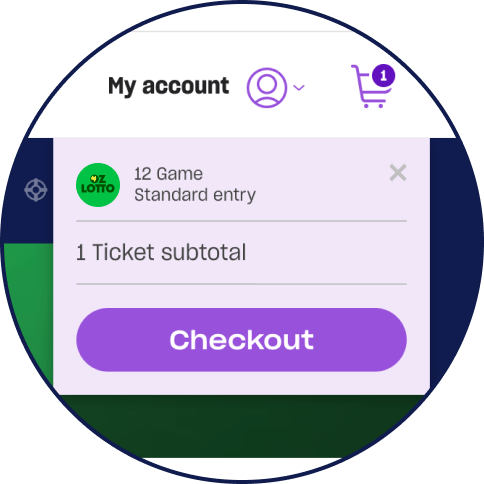
1. Add a lotteries ticket to your cart via the website or app (excluding subscription entries or Play For Purpose entries).
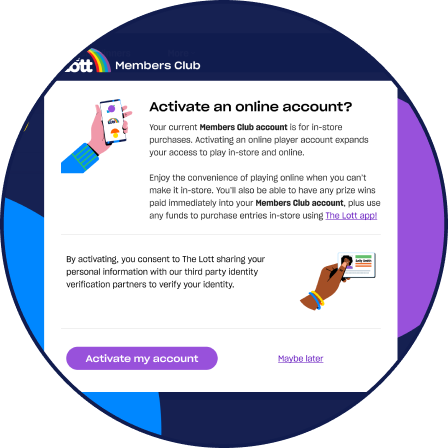
2. You’ll be prompted to accept terms to verify your identity during the checkout process to activate your account.
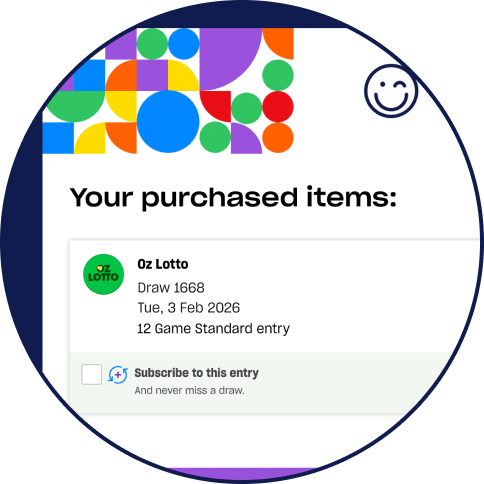
3. Once your online account is activated, you can add funds and complete your purchase.

Your Members Club account will then be activated for both in-store and online purchases.
Once we’ve verified your identity, you’ll then be able to purchase subscription tickets and Play For Purpose entries. If we have any trouble verifying your identity we’ll be in touch to let you know.

Need a hand?
If you have any issues with your online The Lott Members Club experience, please visit our help centre for a list of frequently asked questions like:
Q. How do I receive a physical Members Club membership card?
Once you have signed up to The Lott Members Club you can access a digital version of your membership card via The Lott App, you can also choose to add this digital card to your Apple/Google wallet for quick and easy use to register your in-store purchases.
If you would like to order a physical Members Club card, you can do so by logging into your account and clicking on My Account > Settings > Membership > Order Card and a physical card will be posted to the address registered to your account.
